


Skip to content
header-top-2
About the Event
Module 1: Protein Structure
Module 2: Jmol Training
Module 3: Prebuild Model

Student Team Training Resources

Module 2: The Jmol Training Guide


The Jmol Training Guide 

JUDE (the Jmol User Design Environment) is a free web-based program that can be accessed through any internet browser window and can be used to generate fully interactive 3-dimensional models of molecular structures.

Learning how to manipulate the display of a protein structure with Jmol is a critical part of the Protein Modeling Event, allowing teams to create their Prebuild models and compete in the Onsite Computer Explorations of a Protein Structure. 

For the Onsite Computer Explorations of a Protein Structure, students are required to bring a device with internet capability (laptop, Chromebook, tablet, or phone) to the event. The Event Supervisor will either provide Wi-Fi credentials to allow students to use their own devices on the local network or arrange for a computer lab with internet access and login information for each team in each event session.

Picture16

Part 1 – Colors and Display Formats 

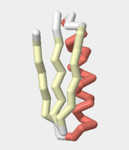
One of the most useful ways to explore a protein structure in Jmol, is by changing the colors and display formats used to represent the structure. 


Picture17

Part 2 – The Select Command 

The select command allows for much more nuanced control of a protein structure in Jmol, allowing for different colors and display formats to be applied to a specific region of A structure. 


Picture18

Part 3 – Adding Sidechains and Ligands 

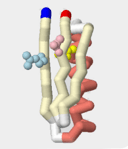
There is more to a protein structure than the path of the folded backbone.  Jmol can be used to display specific key sidechains and ligands in a protein structure. 


About the Event
Module 1: Protein Structure
Module 2: Jmol Training
Module 3: Prebuild Model